
You are here: irt.org | Articles | GNU Emacs | You do have "CSSTYLE" with Emacs [ previous next ]
Published on: Sunday 14th February 1999 By: Pankaj Kamthan
In order to facilitate editing CSS files, HTML editors with CSS-support and special-purpose CSS editors have been developed. However, traditional text-editors such as Emacs can also be configured to CSS editing. As we will see, this approach has various advantages.
In this article, we describe CSS editing with Emacs supported by two modes. We will also briefly discuss the issue of CSS validation. We assume that the reader has an introductory knowledge of CSS and a basic experience with Emacs. Please see the list of references for introductions to both CSS and Emacs. There are various implementations of Emacs, of which GNU Emacs is the most widely used. Unless stated otherwise, by Emacs we mean GNU Emacs.
HTML has become a universal data format for publishing information. It has been designed to focus on structure rather than appearance of the document content. Therefore, support for presentation in HTML is limited. The use of methods to "dodge" the limitations of HTML for presentational purposes undermine the benefits of HTML. The primary reason for the development of CSS is to provide authors a mechanism to control document presentation, while keeping HTML simple as it was meant to be.
A style sheet is a set of stylistic rules that describe how documents are presented to users. Cascading Style Sheets (CSS) is a mechanism for adding style (e.g., fonts, colours, spacing) to HTML documents. Cascading Style Sheets, Level 1 (CSS1) became a W3C Recommendation in December 1996. It describes the CSS language as well as a simple visual formatting model. CSS2 became a W3C Recommendation in May 1998. It builds on CSS1 and adds support for media-specific (e.g., printers) style sheets, downloadable fonts, element positioning and tables.
We can outline the advantages of CSS from the author's and the user's viewpoint:
Basic editing in Emacs is simple. In general, the alphanumeric keys on the keyboard, when pressed, insert the corresponding character into the current buffer. Editing commands are invoked by holding down combinations of the C-, M-, SPC and RET keys (denoting CONTROL, META (ESC), SPACE and RETURN (ENTER) key characters, respectively) while pressing an alphanumeric key. Almost every command in Emacs is a little LISP program that acts upon your text files. To extend Emacs, you simply modify the existing programs or add your own.
There are various advantages of using Emacs over currently available CSS editors:
There are two ways to go about using Emacs as a CSS editor:
We now discuss one of each type.
CSS was designed to work with HTML. It is then natural that authors may want to use HTML and CSS in conjunction with each other. With the use of the major mode html-helper-mode, Emacs can be used as a powerful HTML editor. The CSS module described here, extends html-helper-mode by providing a set of keybindings and a menu while in the mode. The module adds support for a limited set of CSS1 elements (most of which are Microsoft Internet Explorer-specific).
To use the CSS module, you will first have to download and install the html-helper-mode, as it is not part of Emacs distribution by default. See the list of references.
A simple way to load html-helper-mode is to put the following lines (after configuring the path) to your .emacs file on your system. A sample .emacs file has been provided in Appendix I.
(setq load-path (cons "path_to_html-helper-mode_directory/" load-path))
(autoload 'html-helper-mode "html-helper-mode" "Yay HTML" t)
(setq auto-mode-alist (cons '("\\.html$" . html-helper-mode) auto-mode-alist))
Detailed discussion of the html-helper-mode is beyond the scope of this article. You can find a comprehensive treatment of that in the article HTML Editing with Emacs.
The css module can be obtained from sites mentioned in the list of references. After downloading the file, create a directory ~/emacs/lisp/ and move the file css.el to it. Add the following lines (after configuring the path) to your .emacs file on your system.
(setq load-path (cons "path_to_css-module_directory/" load-path))
(add-hook 'html-helper-load-hook
  (function (lambda () (load "css.el"))))
A sample .emacs file has been provided in Appendix I. The module should be ready to use once you load up an HTML file. It should be called after html-helper-mode loads. You can speed-up the loading of css.el files by byte compiling it (using M-x byte-compile-file on the Emacs command line or from the pull-down menu).
The features are:
Figure 1 illustrates a sample session with the CSS module.
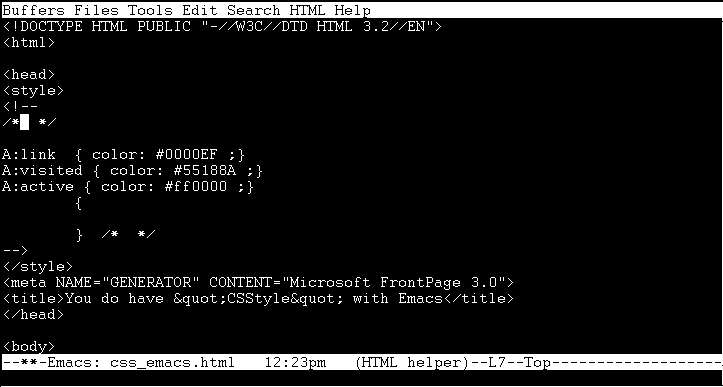
Figure 1: An Emacs session with html-helper-mode and the CSS module.
We describe below the keybindings for all the CSS properties that are supported by the CSS module. [user input] is the value that the user enters when prompted for each item.
| PROPERTY | KEY | INSERTED TEXT |
| EMBEDDED STYLE | C-c C-b y | <style> <!-- //* [user input] *// A:link { color: #0000EF } A:visited { color: #55188A } A:active { color: #ff0000 } [user input] { } /* comments */ --> </style> |
| NEW ELEMENT | C-c C-b e | [user input] { } /* comments */ |
| TEXT | C-c C-b t | text-decoration: [user input] ; text-align: [user input] ; text-indent: [user input] ; line-height: [user input] ; |
| FONT The default font-families are Helvetica and Sans-Serif, since they are supported on most platforms. |
C-c C-b f | font-family: [user input] "Helvetica", sans-serif ; font-style: [user input] ; font-variant: [user input] ; font-weight: [user input] ; font-size: [user input] ; |
| DIMENSION | C-c C-b d | width: [user input] ; height: [user input] ; |
| BORDER | C-c C-b B | border: [border-width] [border-style] [color] ; |
| PADDING | C-c C-b p | padding: [value(s)] ; |
| MARGIN | C-c C-b m | margin-top: [user input] ; margin-bottom: [user input] ; margin-right: [user input] ; margin-left: [user input] ; |
| COLOR | C-c C-b c | color: [user input]; background-color: [user input] ; |
| BACKGROUND | C-c C-b b | background-image: url([user input]) ; background-repeat: [user input] ; background-scroll: [user input] ; background-position: [user input],[user input] ; |
| SPAN Span does not accept highlighting of an area and putting the closing of the element at the end of the highlighted area. |
C-c C-b S | <span ="[user input]"></span> |
| CLASS | C-c C-b C | class="[user input]" |
| INLINE STYLE This could be customized for the values you find most useful. Color and font-size are the default values. |
C-c C-b i | style="color: [user input]; font-size: [user input] ;" |
| EXTERNAL STYLE | C-c C-b l | <link rel=file.css HREF="[user input]" type="text/css" Title="[user input]"> |
This list will grow as changes are made to the module itself.
The css-mode for Emacs supports CSS1 and partially CSS2. It works with Emacs 19.34 or better (as well as XEmacs).
You can obtain the css-mode from the WWW. See the list of references. After downloading, create a directory ~/emacs/lisp/ and move the file css-mode.el to it.
A simple way to load css-mode is to put the lines below (after configuring the path) to your .emacs file on your system. A sample .emacs file has been provided in Appendix I.
(setq load-path (cons "path_to_css-mode_directory/" load-path))
(autoload 'css-mode "css-mode")
(setq auto-mode-alist
  (cons '("\\.css\\'" . css-mode) auto-mode-alist))
You can speed-up the loading of css.el files by byte compiling it (using M-x byte-compile-file on the Emacs command line or from the pull-down menu).
The css-mode requires font-lock.el for font lock support and cl.el for Common LISP extension to GNU Emacs LISP. Both of these are part of standard Emacs (19+) distribution.
The features are:
(setq cssm-indent-function #'cssm-c-style-indenter)
Mirror mode is used for "pattern matching" certain keys. For example, if you type a "{", the matching parentheses "}" is automatically inserted. Other keys that are mirrored are " and (.
Completion lets you use C-c TAB to complete the CSS property you are currently typing. It works in the usual manner of TAB completion.
Here is a list of all CSS1 properties supported by the mode:
font-family, font-style, font-variant, font-weight, font-size, font, background-color, background-image, background-repeat, background-attachment, background-position, color, background, word-spacing, letter-spacing, border-top-width, border-right-width, border-left-width, border-bottom-width, border-width, list-style-type, list-style-image, list-style-position, text-decoration, vertical-align, text-transform, text-align, text-indent, line-height, margin-top, margin-right, margin-bottom, margin-left, margin, padding-top, padding-right, padding-bottom, padding-left, padding, border-top, border-right, border-bottom, border-left, border, width, height, float, clear, display, list-style, white-space, border-style, border-color.
Here is a list of all CSS2 properties supported by the mode:
azimuth, border-bottom-color, border-bottom-style, border-collapse, border-left-color, border-left-style, border-right-color, border-right-style, border-top-color, border-top-style, caption-side, cell-spacing, clip, column-span, content, cue, cue-after, cue-before, cursor, direction, elevation, font-size-adjust, left, marks, max-height, max-width, min-height, min-width, orphans, overflow, page-break-after, page-break-before, pause, pause-after, pause-before, pitch, pitch-range, play-during, position, richness, right, row-span, size, speak, speak-date, speak-header, speak-punctuation, speak-time, speech-rate, stress, table-layout, text-shadow, top, visibility, voice-family, volume, widows, z-index.
You can check for the list of keybindings using mode help by typing C-h m from within the mode. Figure 2 illustrates a sample session with the css-mode.
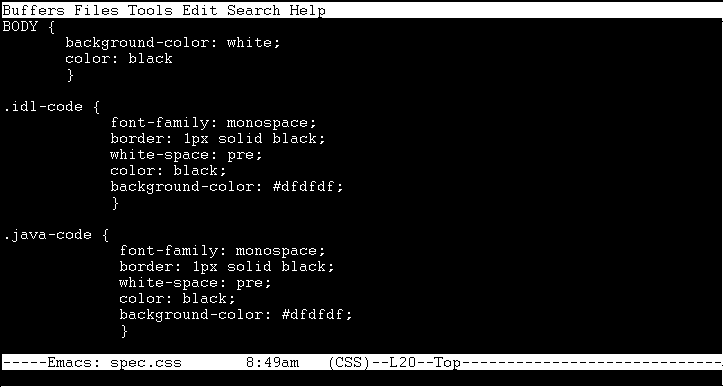
Figure 2: An Emacs session with the css-mode
If you do not wish to use the mode, you can turn it off (1) temporarily by the command css-leave-mirror-mode while in a CSS-mode buffer, or (2) permanently by editing the css-mode.el file and setting the variable css-mirror-mode to nil.
One of the caveats of the mode is the lack of support for colour (such as with the support for hilit19 mode).
Once you have edited a CSS document, the next obvious issue is of validation. None of the above Emacs-based methods perform actual validation with respect to CSS specifications. For that, you can use the online W3C CSS Validation Service. You can also download the validator files and use it offline.
The following is a referral CGI gateway for the validator. You can enter the URL of a document (that has HTML with CSS - those created with the help of the CSS module or CSS only - those created with help of the CSS mode) that you would like to be validated:
You can also validate your CSS with a text area or by upload.
Help authors help CSS help authors
Separating presentation from content and structure, and using CSS for the purpose of presentation, has numerous benefits. Using Emacs for editing CSS files using either the CSS mode or the CSS module can be quite useful, if one is familiar with the CSS syntax. Validating the resulting CSS files will help you to create documents that conform to existing standards of the language.
;;;;;;;;;;;;;;;;;;;;;;;;;;;;;;;;;;;;;;;;;;;;;;;;;;;;;;;;;;;;;;;;;;;;;;;;;;;;;;;
;; File: .emacs
;; Author: Your Name
;; Description: Emacs Customizations
;;;;;;;;;;;;;;;;;;;;;;;;;;;;;;;;;;;;;;;;;;;;;;;;;;;;;;;;;;;;;;;;;;;;;;;;;;;;;;;

;;;;;;;;;;;;;;;;;;;;;;;;;;;;;;;;;;;;;;;;;;;;;;;;;;;;;;;;;;;;;;;;;;;;;;;;;;;;;;;
;; CSS mode
;;;;;;;;;;;;;;;;;;;;;;;;;;;;;;;;;;;;;;;;;;;;;;;;;;;;;;;;;;;;;;;;;;;;;;;;;;;;;;;

(setq load-path (cons "path_to_css-mode_directory/" load-path))
(autoload 'css-mode "css-mode")
(setq auto-mode-alist
  (cons '("\\.css\\'" . css-mode) auto-mode-alist))

;;;;;;;;;;;;;;;;;;;;;;;;;;;;;;;;;;;;;;;;;;;;;;;;;;;;;;;;;;;;;;;;;;;;;;;;;;;;;;;
;; CSS module
;;;;;;;;;;;;;;;;;;;;;;;;;;;;;;;;;;;;;;;;;;;;;;;;;;;;;;;;;;;;;;;;;;;;;;;;;;;;;;;

(setq load-path (cons "path_to_css-module_directory/" load-path))
(add-hook 'html-helper-load-hook
  (function (lambda () (load "css.el"))))