
Representation of Japanese Language Characters on the WWW
You are here: irt.org | Articles | World Wide Web (WWW) | Looking for Something? : Searching the Web [ previous next ]
Published on: Sunday 20th June 1999 By: Pankaj Kamthan
The Web is one of the world's largest sources of publicly available information. It provides a myriad of information, though still lacks in navigational aids. It is important for users to search relevant information efficiently and quickly on the Web. As GVU Center's 10th WWW User Survey (October 1998) shows, finding both existing and new information is a significant problem that is currently facing the Web in general.
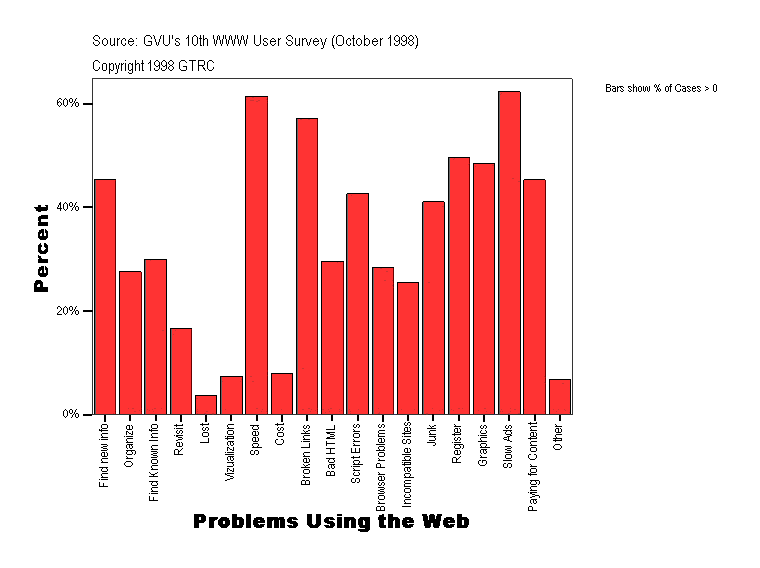
Figure 1. Problems Using the Web.
To help us deal with incredible amount of data, a new skill is needed: Web searching. Given a topic, anyone with a Web browser and access to the Internet can search the Web for information on that topic. Searching, however, is not the same thing as finding. There is little organization or consistency on the Web.
A variety of problems can occur while searching through the Web:
A successful search requires a search strategy, which depends on the search object, view of the Web, search tool, query (if the search tool is a search engine) and search technique.
There are a number of possible views of the Web, as illustrated in Figure 2 and outlined in Table 1. A key to effective searching (as pointed out in NetResearch: Finding Information Online, By Daniel J. Barrett, O'Reilly & Associates, 1997) is to be able to change one's view of the Web as needed.
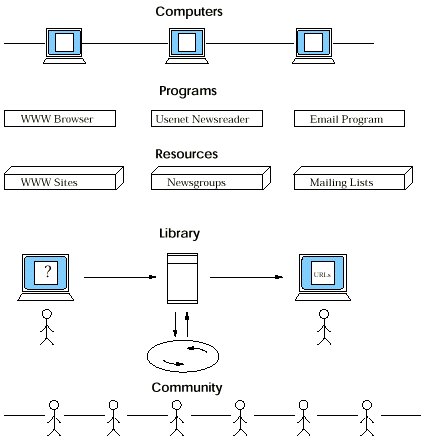
Figure 2. Views of the Web.
| WEB VIEWPOINT | APPROACH | EXAMPLES | ADVANTAGES/DISADVANTAGES |
| Web is a group of Computers | Computer Engineering | Every computer on the Internet has a unique "name", such as www.irt.org. | The advantage of knowing some computer names during searching is speed. The disadvantage of this view is that one has to remember a lot of computer names (though this can be circumvented to certain extent as the naming is standardized and follows an intuitive pattern). |
| Web is a set of Programs | Computer Science | A search engine, such as AltaVista. | The advantage of knowing a specific program can speed-up the search. The disadvantage of this view is that it ignores intuition; just because one knows every single feature of a search engine does not mean that the search will always be effective. |
| Web is a collection of Resources | Information Technology, Publishing | Web sites can be viewed as "Yellow Pages", that is, a collection of resources. | The advantage of this view is that resources on a topic one is trying to locate may already exist; all one has to do is to look them up. The disadvantage of this view is that such resources may go out-of-date, they list only a few (at time biased) resources on each topic, and are limited to searching on topic at a time. They are not useful for searching a combination of topics. |
| Web is a Library | Library Science | Web can be viewed as a large collection of libraries worldwide. In this view, a Web document is a "book", a URL is the "call number" and a search engine is a "librarian." | The advantage of this view is that users are often familiar with the way libraries are organized. The disadvantage of this view is that each of these libraries has its own method of organizing and accessing information, there is no master index of all libraries and their contents, and there is no "roadmap" to get from one libary to another. |
| Web is a Community | Sociology | People "communicate" with each other via e-mail, chat, or a bulletin-board. | The advantage of this view is that there are many knowledgeable people with access to the Internet who can help locate a resource. The disadvantage of this view is that such a facility can easily be misused. For example, students can post their assignment problems and obtain solutions to them without the knowledge of the teacher, or by users asking overwhelming number of general questions. |
Table 1. Web from the Viewpoint of Searching.
Search engines are powerful tools for seaching the Web. The way a search engine works is simple. The words given to search to a search engine are keywords and a set of one or more keywords is a query. A search engine has access to a catalog of Web pages, and uses it to locate a query. If a search engine finds a Web page in its catalog that matches a query, the matching page is a hit.
We call a search engine local if it searches only the information local to a Web site. Such a search facility is available, for example, at irt.org. These engines are often CGI scripts which act as a gateway. Some popular scripts/programs in use today are given in the list of references.
The HTTP protocol limits the possibilities and usefulness of the Web as an integrated Internet access platform since many things we expect to use are not available through the Web. One solution to this problem is to use gateways. A gateway is a program that functions as an interface between two systems. In this case, on one side there is the Web and its HTTP protocol, and on the other side there are other Internet protocols or applications. Gateways are specially designed scripts/programs in a computer language (Perl, C, shell scripts, and so on), complying with the CGI specification or some proprietary API specification.
Table 2 reflects the usefulness of search gateways in various contexts. Such gateways, though (by their very nature) limited in their reach, can be very useful. As more and more of such specialized search engines appear on the Web, it will become relatively easier for users to find information relevant to their topic(s) of interest.
| TOPIC | EXAMPLE |
| Books | Amazon.com Bookstore |
| Documentation | UNIX man Pages |
| Graphics | GIF Optimizer |
| Networking | DNS Lookup (InterNIC and CDNNet) |
| Reference | PC Webopaedia |
| Software | CPAN |
| Language Validation | XML Validation |
Table 2. Examples of Gateways in Use.
There are more examples on C|net.
Local search engines, such as those that are CGI-based, vary in degree of features and complexity they offer. From a design and implementation point of view, some desirable features are described below:
This is sufficient for searching the term "JavaScript" but not necessarily for "JavaScript Image Rollover" as the user can not see what is being entered without scrolling. "Hardwiring" (by using maxlength attribute in the above case) a query length is also not a good practice.
A guide with examples of some possible queries can be useful here to the user.
We call the search engines on the Web which are not local as global. There are three types of global search engines: active, passive and meta-search. See Figure 3. We now describe each of them in detail, including there advantages and limitations.
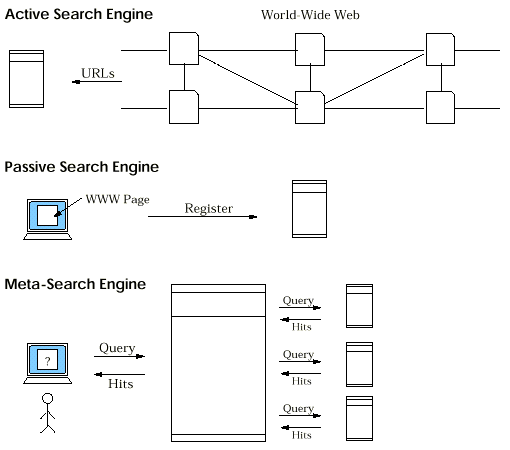
Figure 3. The Three Types of Web Search Engines.
A collection of some specialized global search is available at http://www.search-engines.net/.
Inspite of the strength of search engines as a search tool, there are certain limitations (particularly, of global search engines) that one should be aware of in their usage. These are:
The success of Web search depends heavily on the keywords chosen. It is important to know how are they treated by specific search engines. A simple query consists of just the keywords one wishes to search. Usually, simple queries can be too broad, resulting in a response with many unrelated hits. An advanced query consists of Boolean operators to include or exclude keywords from the search. The type of operators supported by a search engine define its query language. Different search engines usually have different query languages which can be found on their respective Web sites, often included in options for a "power search."
Using certain search techniques, searching time and effort can be greatly reduced. The techniques can be of the following type:
Table 3 summarizes the search strategies for some typical (search) objects. See also Getting the Most Out of Your Search Engine for the specific features that you could consider when carrying out a search using a global search engine.
| OBJECT | WEB VIEW | SEARCH TOOL | QUERY | TECHNIQUE |
| Topic | Library | Search Engines | Advanced | Category |
| Document | Library | Search Engines | Advanced | Specific Search |
| Software | Resource | Usenet FAQ | Advanced | Search-and-Jump |
| People | Community | Search Engines, Usenet | Advanced | Specific Search |
Table 3. Web Search Strategies.
Effective searching strongly depends on how and in what form the information itself is organized on the Web. The Web was originally built for human consumption, and although everything on it is machine-readable, this data is not necessarily machine-understandable. HTML till now has been a universal data format for publishing information on the Web. It was designed to focus on structure, and therefore has very limited support for attaching any "meaning" to the content of a document. The development of eXtensible Markup Language (XML) addresses this problem to a large extent.
Metadata is "structured data about data." For example, a library catalog is metadata, since it describes resources in the library. In our context, it is "data describing Web resources." For example, the HTML <META> tag describes the content of a Web document. Metadata facilitates searching, helping authors to describe their documents in ways that browsers, search engines and robots can understand. As a result, users can have better document discovery services available to them.
Resource Description Framework (RDF), which is an XML application, is a foundation for processing metadata. It provides interoperability between applications that exchange machine-understandable information on the Web. Till now, automated processing of information on the Web has been very difficult because of the sheer volume. RDF emphasizes facilities to enable automated processing of Web resources.
RDF's syntax specification became a W3C recommendation on February 22, 1999. As pointed out in the specification, RDF could enhance our searching capabilities in a variety of ways: in resource discovery to provide better search engine capabilities, in cataloging for describing the content and content relationships available at a particular Web site, by intelligent software agents to facilitate knowledge sharing and exchange, in content rating, in describing collections of pages that represent a single logical "document."
However, a widespread acceptance and use, and requisite software development for processing, both XML (as a data format that incorporates "meaning") and RDF (as a metadata framework), will be necessary for this to become a reality.
Towards ... Eureka!
Searching the Web is an art, as well as, a science. There are no perfect solutions; each have their own advantages and limitations. There is also no substitute for human experience. But a blend of that with intuition and knowledge of some basic techniques can make the journey both enjoyable and fruitful.
In "searching for something", the "something" (in our case information) is as important as the methodology of searching itself. It is expected, at least from the perspective of a computer-based search, that the organization of information on the Web (and thus its searching) will improve as the use of XML and RDF becomes ubiquitous.
Statistical graph presented in Figure 1 is from GVU Center's WWW User Surveys of GTRC and the GVU Center. It is "Copyright 1994-1998 Georgia Tech Research Corporation. All rights Reserved" and its use is hereby acknowledged.
Representation of Japanese Language Characters on the WWW