E-Store on the Web : Let's Go Shopping!
You are here: irt.org | Articles | E-Commerce | E-Store on the Web : Let's Go Shopping! [ previous next ]
Published on: Monday 26th July 1999 By: Pankaj Kamthan
Introduction
E-Commerce on the Internet has various
prospects,
one of them being selling over the Web. To enable your
customers to view your products (or services) and place orders, you
need to place those in an electronic store (e-store) accessible over
the Web.
An e-store operates as follows: It consists of a product catalog
(where the online customers select what they want to order), a program
(such as a shopping cart, where product selections are collected),
transaction security (credit authorization and other payment schemes),
and processing (taxes, shipping, inventory, and so on). All of these
components, when combined and working in coherence, give the store a
personality and the customers a feeling of true shopping experience.
Tools of the Trade
There are a wide variety of software programs with varying
functionality that can help you build an e-store. Whether you are a
small business looking to sell globally, or a company that is already
doing world-wide business, the right store software can make all the
difference.
Choosing an E-Store Software
One of the most critical decision for a company to engage in
e-commerce is determining which e-store software to deploy. There are
various choices in e-store software, each with their own advantages
and limitations:
- Customized. One solution is to develop your own
customized software. The advantage is that one has complete control
over the design. However, this may not always be practical or
feasible, given the resources and time constraints. Also, developing a
quality shopping cart is nontrivial as it requires the work of many
specialists in various aspects of programming and the Web technology,
and rigorous testing.
- Freeware. It has the obvious advantage of being
free (or freely available under certain terms and conditions). In
cases where the source code is available, they could, given the basic
knowledge, be customized, and given the permission, be extended. The
limitations of these are that they may not have the same quality and
support that is expected of a commercial product, and may not
necessarily be as well-tested.
- Commercial. There are now many commercial
software products on the market, ranging in price from a few hundred
to thousands of dollars. Companies such as
IBM and
iCat
make e-store software to fit the needs of companies of all shapes and
sizes. For information on some products reviews available, see the
references.
(There is also a
review
of one such product,
Actinic Catalog,
by the author.) In
some cases, you don't even have to buy the software, but simply
"rent" a Web site and programming from a Web host. For a
detailed discussion, see
The Well Equipped Host.
The advantages of these commerical products are: quality, reliability
and vendor support. The limitations are that one is confined to the
features the software offers, and to the terms and conditions of its
use. Also, being proprietary means that support for a product may
cease to exist in the future.
A Shopping Cart Classification
At the heart of an e-store is a shopping cart. It is an
appropriate metaphor of the familiar shopping cart used in a
supermarket due to the type of convenience and control it offers
people for shopping in the real world. People push shopping carts
through the aisles, pick and choose the items needed and ignore those
that are not. They add and remove items from the carts almost without
much effort or thought. A shopping cart program is an effort to
translate the convenience and control over purchasing in the real
world to which people are so accustomed, to the (electronic world of
the) Web. It is essentially an (complex) extension of a simple order
form. A simple order form is generally limited in the amount of
interactivity it gives to the customer, and allows only a limited
number of products and options.
There are several different types of shopping carts possible, each
with their own advantages and limitations:
- Traditional CGI Shopping Cart. The advantages are
that they are supported by all the major browsers. The limitations are
that they can be hard to set-up and maintain, can be slow, and waste
bandwidth and system resources.
- CGI/Cookie Shopping Cart. The advantages are that
they can easily be set-up and maintained. They are faster than
traditional CGI shopping cart and use less bandwidth and system
resources. The limitations are that they are not supported by browsers
that do not support cookies, and become ineffective in cases where the
user chooses to turn off cookie support in their browsers.
- Java Applet-Based Shopping Cart. The advantages
are that they can have a rich and visually please interface (as now
one is not limited by HTML). The limitations are that since you have
to build your store inside the applet, it is hard to customize, and
they can be slow.
- JavaScript/Cookie Shopping Cart. The advantages
are that they are fast, easy to set-up and maintain, easy to
customize, save bandwidth, and save system resources. The limitations
are that they are not supported by browsers that do not support
cookies/JavaScript. Furthermore, it can be difficult to set-up large
shopping carts by this approach.
The question, therefore, you will have to ask yourself is: Do I
need a e-store software which is equipped with a shopping cart?
For a small number of products with few options, a full-fledged
shopping cart is not necessary. In such as case, a customized single
page with an ordering form that can be connected to a
"form-to-mail"-type CGI script, may be sufficient. If you
have a large number of products with various options, it may be
inconvenient and even unrealistic to include them all in a single
page. In such a case, it is preferable to display the products over a
sequence of pages, which would include a navigation system for
customers to move around, select items they need (and remove items
they do not need), and once done, will be able to checkout. This would
require state persistence from page to page, and thus an actual
shopping cart.
It is recommended that you choose the e-store software based
on the shopping cart approach it uses.
We will now discuss an e-store software, PerlShop, which has many of
the advantages of the three categories mentioned above.
PerlShop
PerlShop
is a shopping cart program written in
Perl
is extremely customizable and offers a variety of features.
Advantages of PerlShop
Advantages of PerlShop can be seen in the features that it offers:
- Cataloging. Catalog pages may use any custom
design or layout, PerlShop only adds an optional navigational menu
bar, and submit buttons or images to your pages. There are options to
use images for submit buttons, customizable date and currency formats
for international use. Catalog pages can be server independent. You
can use
Server Side Includes
(SSI) on catalog pages.
- Indexing and Searching. It does not require any
indexing of catalog pages. There is a built-in search feature for
keyword searching directories and subdirectories of catalog pages, and
highlighting the hits. There is an optional logging of page hits and
search patterns. Since searches can be logged, you can see what
customers want, but that you don't have. Since the pages are not
dynamically generated, they can be used by
global search engines
for indexing.
- Ordering. Order files are created in CSV format
(comma separated, quoted fields) for easy import into a
database. Customers do not need to pre-register before ordering
items. There is a comprehensive error checking of customer input, for
example, it validates that credit card numbers and e-mail addresses
are in the proper format. It automatically calculates all totals and
order confirmation can be e-mailed to customer and to the
merchant.
- Taxing. It automatically calculates sales tax
based on customer's location.
- Shipping. It automatically calculates shipping
charges based on price, quantity or weight using a customizable
shipping rates table.
- State Persistence. The script has the option
(that can be enabled/disabled) to use cookies to allow a customer to
order some items, leave your site, then return at a later date or time
and immediately receive a message that they have an outstanding order,
and be given the option of continuing to add new items to the existing
order, or to start a new session with an empty "cart".
Since the cookie is stored on the customer's computer, it will only
let the customer continue an order on the same computer that the
original items were ordered on.
- Performance. PerlShop is relatively fast because
it does not use any external libraries when starting up, or
dynamically generated pages from a database.
- Portability. The script will work with any
browser, and any server which supports CGI.
- Maintenance. Since each item in the catalog has
to be included in an HTML page, it allows you to customize each
individual page and update your catalog by just uploading the new
pages.
q- Y2K Compliancy. All dates are Y2K compliant.
Requirements
PerlShop is AdverwareTM. The only requirement to use
PerlShop is to display the "Powered by PerlShop" logo

on the main page of your catalog, with a link back to the PerlShop
home page, and also keep the logo on all PerlShop generated
pages. There is no other cost.
PerlShop requires Perl 5, and access to running CGI scripts on the Web
server. PerlShop has currently been tested under UNIX running the
Apache
server, and under Windows running the O'Reilly's
WebSite server.
We will restrict ourselves to Apache for the sake of this discussion.
Obtaining and Installation
You can download PerlShop from
here.
It comes with a script PerlShop.cgi, a user manual, and a
demo. Simply copy the script to your cgi-bin directory and mark it as
executable, create a few directories and change their permissions,
then just modify the script to customize it for your server address
and business procedures. You can refer to the
manual
for details of installation, which have been given in a step-by-step
and methodical manner. Few crucial points to note are:
Creating the Catalog Pages
PerlShop uses a special catalog page format. The order of the HTML
tags is very important. Every PerlShop HTML tag must
be on a line by itself and the "ITEM_CODE" tag
must be the last tag before the closing
</FORM> tag. If any of the optional tags related to
weight, taxing system, or options exist, then they must appear before
both the item ID and item price tags. An example of a single item
selection form is shown below:
<FORM METHOD=POST ACTION="URL">
<IMPUT TYPE=SUBMIT NAME=Submit value="Submit">
<INPUT TYPE=HIDDEN NAME=ACTION VALUE="ORDER">
<INPUT TYPE=HIDDEN NAME=ORDER_ID VALUE="!ORDERID!">
<INPUT TYPE=HIDDEN NAME=ITEM_ID VALUE="12345">
<INPUT TYPE=HIDDEN NAME=ITEM_NAME VALUE="The General Theory of Relativity">The General Theory of Relativity $123.45 <BR>
<INPUT TYPE=HIDDEN NAME=ITEM_PRICE VALUE="123.45">
<INPUT TYPE=HIDDEN NAME=some_name value=catalog_page1.html>
Quantity:<INPUT TYPE=TEXT SIZE=3 MaxLength=3 NAME=QTY VALUE="1">
<INPUT TYPE=HIDDEN NAME=ITEM_CODE value="!ITEMCODE!">
</FORM>
It is therefore not recommended to use HTML editors such as FrontPage
98 which often insert their own tags and/or do not necessarily
preserve the order of HTML tags. If the catalog will eventually lie on
a UNIX server (and for portability reasons), it is also not
recommended to use editors such as Windows Notepad/Wordpad which do
not understand UNIX text format. with these scripts. Instead, you
could use the
Emacs editor with the HTML mode,
PFE or other editor that understands UNIX text format.
A
demonstration store
is available.
Security
PerlShop as distributed includes several security features, but these
must be augmented by external programs for real security.
- File Security. The files under a Web server are
usually created under the user 'nobody'. This is not very secure since
anyone else running a script under the default 'nobody' user would
have access to those files. The only way to secure the PerlShop output
files is to run it under your own userid. This can be done by using
the program
cgiwrap,
or if you are using Apache Web server, by enabling the
suEXEC
directive.
The output files should be created in subdirectories of your
cgi-bin directory, and not within your server's document
directory tree. The output files are not encrypted online, since
(unless you use public-key encryption, such as by PGP) anyone having
access to them would obviously have access to the encryption key used
within the program as well. The output files should be periodically
removed, and if not, should at least be encrypted.
- Transaction Security. PerlShop attempts to
guarantee the integrity of each transaction by creating a digital
signature of the data sent in each transaction, and sending the
signature along with the data. On receipt of each transaction, the
signature is recomputed and compared to the one received. If there
were any alterations of the data, the two signatures would not
compare, and the transaction is rejected. To further strenthen
security, PerlShop can be used with a server that supports the Secure
Socket Layer (SSL) protocol. Apache Web server supports SSL via an
add-on module
mod_ssl
(which is available but not compiled in by default).
PerlShop has an option to put the credit card information on the
merchant's copy of the order confirmation e-mail. This can severely
compromise all of the other security precautions you might take, and
should be used with caution.
In the end, security of a transmission is only assured if you run the
script under a Web browser/server combination that supports
encryption.
Payment Methods
You can give your customers the ability to complete the ordering
process by receiving verification that their payment has been accepted
(or rejected) within moments of placing the order. In order to provide
this feature, you can apply to either
First Virtual,
or
Versanet (SecureOrder)
for a
merchant account.
Modifying the PerlShop script to enable either payment option is
fairly straightforward.


Limitations of PerlShop
- Prerequisites. Effective use of PerlShop requires
that the user is familiar with the various conditions under which it
works, including basic knowledge of CGI, configuration of Perl files,
and Web servers. This could be a steep learning curve in some
cases.
- State Maintenance Using Hidden Fields. The
problem with using hidden input fields is that they are not really all
that hidden as anyone can see the contents of the hidden field by
looking at the source. Therefore, it is possible that a user can
download the page through his/her browser, change hidden fields by
hand, and then resubmit the page with the changed information. This
poses a potential security risk if the proper precautions are not
taken. The simplest way to avoid the problem of someone trying to
submit a form in which the elements of the hidden input fields have
been changed, is to verify the path that the form is submitted from
(contained in the environment variable PATH) and reject input
from improper paths. For a detailed treatment of this issue, see
Chapter 5: Maintaining State,
Writing Apache Modules with Perl and C,
By Lincoln Stein & Doug MacEachern, O'Reilly & Associates,
1999.
- Performance and Scalability. PerlShop uses a CGI
script in Perl for processing. PerlShop also does not use any
client-side validation, such as using JavaScript. It can therefore
suffer from
performance and scalability problems associated with CGI scripts
in general. If the store is being used under the Apache Web server,
the performance can be enhanced manyfold by using the Apache module
mod_perl,
which embeds a Perl interpreter in the server. For other possible
solutions, see the article
Speed Thrills : CGI Please ... and Fast.
- Lack of Inventory. There is no support for
integration to any back-end accounting or inventory systems in
PerlShop. This can lead to the possibility that a product may not be
in stock when a customer orders it.
- Lack of Support. Since PerlShop is free, there is
no explicit support provided. You may send email about any problems,
bugs or suggestions to
PerlShop@arpanet.com,
but a response is not guaranteed. Customization of PerlShop is
available for a fee, however.
Content is $
Setting up an e-store is a major step in the direction of
e-commerce. However, it is not a magic bullet that will automatically
lead to a successful business. As an example, glitzy graphics on a Web
site may impress customers but do not necessarily guarantee
sales. According to the
GVU Center's 10th WWW User Survey
(October 1998), quality is the most desirable feature in E-Commerce
that the users look for (Figure 1)
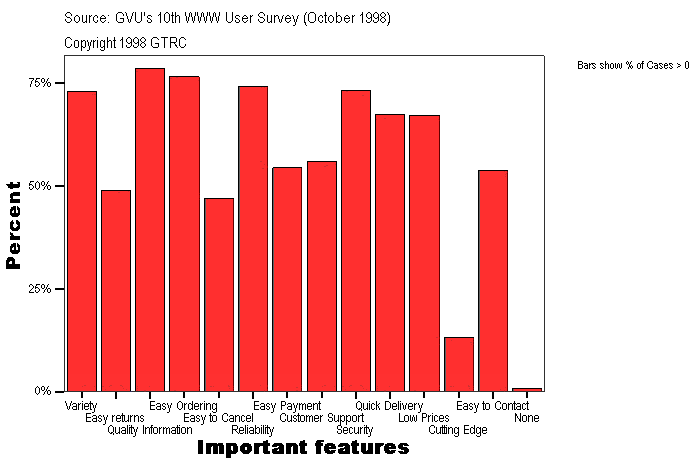
Figure 1.
and (lack of it) is the major reason for people not
purchasing (Figure 2).
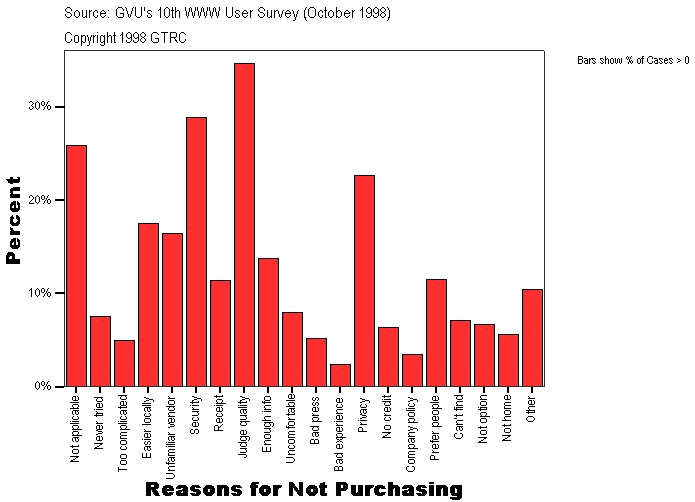
Figure 2.
Ultimately, a store must entice potential customers to make a
purchase. To a large extent, Web sites hosting e-stores can accomplish
this with a well-planned design, both in terms of content as well as
presentation. Here are some guidelines:
- Speed. The vast majority of customers connect to
the Internet from their homes with relatively slow connections,
particularly the international customers. For this reason, a store
should load fast and not bogged down by overly long content or
graphics. One solution is to display product "thumbnails"
with an initial product description, and give the customer the option
of clicking on the thumbnail to see the original size of the
image.
- Customer Privacy and Security. When purchasing on
the Web, customers are often required to provide an entire host of
personal and billing information. In general, requiring these
disclosures can discourage customers from purchasing. To alleviate
customers' privacy concerns, the well-designed sites provide
guarantees in form of "Privacy Policies" that customers'
personal information will not be passed on or sold to other companies
for the purposes of solicitation. For example, in PerlShop, the only
information stored in the cookie is the unique-id assigned to
the customer's session, and this fact could be pointed out to the
customer. Customers may also have legitimate concerns about
transaction integrity, control, authorization, confidentiality and
anonymity. For the business to thrive, such issues must be
addressed. See the article
E-Commerce on the WWW : A Matter of Trust,
for more details.
- Accountability. Apart from privacy and security,
another factor affecting customer confidence is a concern that they
might be dissatisfied with the product purchased without the benefit
of examining the product physically beforehand. For example, colours
of a product displayed on a computer monitor will vary from their
actual colour, or size of a product might turn out to be smaller than
anticipated. An accountable e-store should announce an unconditional
exchange or refund policy to increase customer confidence, which is
essential to the success of any business.
Conclusion
Businesses can engage in e-commerce by setting up Web sites with
e-stores. Determining which software to deploy for that purpose is a
critical decision for a company; Packages such as PerlShop offer an
inexpensive and powerful solution. Web sites which incorporate these
e-stores need to be well-planned and designed to succeed in this
competitive arena.
References
Related items
E-Commerce on the WWW : A Matter of Trust
E-Commerce on the WWW : Prospects and Concerns
E-Payment on the WWW : An Introduction to Merchant Accounts
Feedback on 'E-Store on the Web : Let's Go Shopping!'
©2018 Martin Webb
