
You are here: irt.org | Articles | Graphics | MetaFlash: A New Take on 3D [ previous next ]
Published on: Sunday 28th November 1999 By: Ryan Detert
A few weeks back ZDNet hosted their Seybold Seminar at Moscone Center in San Francisco. Here, I was able to sample the latest and greatest that various companies had to offer. Two corporations attending the convention were MetaCreations and Intel. Individually, they both came up with some great stuff such as Canoma and the Pentium III Xeon processor, but together, they have invented a revolutionary technology that allows you to convert 2-dimensional pictures into a 3-dimensional object on your computer screen that is as easy as taking a couple of pictures.
The MetaFlash 3D Camera is the new camera that allows the MetaFlash technology to take effect. (No surprise here I'm sure.) The camera looks similar to a larger rendition of a regular digital camera. The 3D cameras are not available on the market just yet but are currently being manufactured and tested by Minolta and are scheduled to be released before November of this year. The prices of these cameras are being set by Minolta but a tentative estimate by MetaCreation spokesperson puts it in the $3,000 - $4,000 range.
The camera functions in much the same way as a regular camera except for one main difference, it takes two different pictures every time you press the button. The first picture is taken with a white light flash and results in a picture that looks like one taken from your camera at home, however a second flash comes right after and this is where the magic begins. The second flash is made up of bands of colored light rather than a single illuminescant burst of light. With these bands of different colored light streaming across a solid the shadowing on the bands allows the computer to distinguish the depth and contours of an object. Below are the actual two pictures that I had taken at Seybold Seminar at Intel's Developer Pavilion. (Note that I wanted to look a little crazy.)
 |
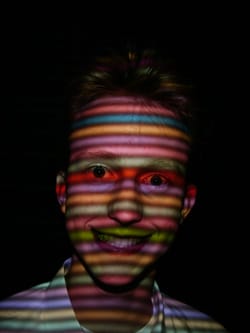 |
| Normal picture resulting from the first flash. | Hi-tech picture generated from the second flash. |
If you don't already have the MetaStream plug-in then go get it right now so that you can share the experience with me.
After creating your MetaFlash object with a product such as MetaCreation's MAX 250 MetaStream Exporter, it can easily be exported as a MetaStream plug-in for your web browser. The new file will have a .mts extension and can be viewed in your browser via either the <embed> or <object> tags. The easiest and most popular method to use is the <embed> tag. There are a number of attributes that accompany both tags, but since there are so many I will point out a few of the essential ones and leave you to check them out for yourself at MetaCreation's web sites at embed tag attributes and object parameters.
Notice that this is only my face, this is because only one picture of my head was taken. In order to have a complete 3-dimensional solid of my head you would have needed to have taken a picture of the top of my head, each profile and the back of my head, and then merged these picture together with MetaStream software. The whole process would take an estimated 30 minutes.
The HTML embed tag for the above image looks like:
<embed SRC="me.mts"
       WIDTH="300"
       HEIGHT="300"
       TYPE="application/metastream"
       LinkName="Please Worship Me."
       UI="Black"
       CULL="Back"
       Renderer="pbtr"
       Rotation="global"
       2DScale="0.52"
       YawLimit="35"
       PlatterAngularSpeed="12"
       Camera="0.000 0.000 -3.460 -0.314 0.089 -0.706 268.191 -1.600 1.630 -0.000 1.000"
       PluginsPage='http://www.metastream.com/plugins.html'
       BgImg="lake.jpg"
></embed>
You can also view the plain MetaStream of my face.
With the induction of the new MetaFlash technology it is easier than ever to reproduce a 3-dimensional object onto a 2-dimensional screen. Perhaps one day we will be able to inspect items thoroughly before we buy them online. Until then keep your eyes peeled.
Photoshop - Graphics Workshop #2