
Perspectives of XML in E-Commerce
XML Conformance : The Burden of Proof
XML Entities and their Applications
XML Namespaces : Universal Identification in XML Markup
The Emperor has New Clothes : HTML Recast as an XML Application
You are here: irt.org | Articles | Extensible Markup Language (XML) | XML and CSS : Structured Markup with Display Semantics [ previous next ]
Published on: Sunday 2nd January 2000 By: Pankaj Kamthan
In the last year, XML has emerged as a "universal" data format in a variety of application areas, such as physical sciences, engineering, and electronic commerce. Optimal presentation of such data to the user in a desired manner then is an important issue. One way of doing that is to use the traditional CSS approach by taking advantage of CSS support for XML in CSS, Level 2 (CSS2).
The objective of this article is to discuss the viability of CSS in decorating XML documents. We assume that the reader is familiar with the basics of XML, CSS and [X]HTML. For pointers to tutorial introductions to these languages, see the list of references.
Style sheets are an essential step in XML deployment, as without them
there is no way to define the presentation of XML documents which use
new schemas.
- Tim Berners-Lee, Press Release
of Associating Style Sheets with XML documents
<img> could mean an
image, or an imaginary number; even the seemingly obvious
<manual> could mean a technical book or a form of
human labour. (In an informal language (such as English), we (humans)
know the difference due to the "context." However, such
semantical distinctions are not possible in formal languages being
processed by machines.) In such a case, a user agent would not know
how to "display" elements of these "home-brewed"
languages. This is where the use of a stylesheet language such as CSS
becomes necessary, which provides the display semantics to an XMl
document..
XML Spy is a professional validating XML editor that provides three integrated views on XML documents: an enhanced grid view for structured display and editing, a low-level source view with syntax coloring, and an integrated browser view that supports CSS stylesheets. Among other features, it includes Unicode and character-set encoding as well as support for XHTML and XML Namespaces. Another useful feature of XML Spy is that a DTD may be edited simultaneously with the XML document that references it. Here is a screenshot of an example that we will discuss later:
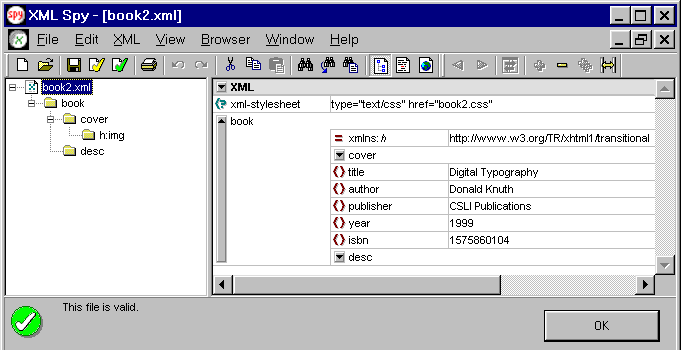
XMetaL is another notable environment for authoring XML documents with CSS. These visual environments simplify the editing process (and thus reducing the burden on the author) by including required directives or tags. For simple documents, any text-editor (such as Emacs) can be used (assuming that the author is well-versed in XML as well as CSS).
The use of CSS in XML involves the following steps:
There are two types of stylesheets possible with XML documents:
Although the XML specification has been in existence since February 1998 and the CSS (CSS2) specification since May 1998, the mechanism to associate a stylesheet with an XML document was formalized only in June 1999.
The association consists of inserting the XML processing instruction at the top of the
document, before the root element of the XML document and after the XML prolog. The
processing instruction has two required attributes type and href
which respectively specify the type of stylesheet (Internet Media Type text/css)
and its address (path). An example is:
<?xml-stylesheet type="text/css" href="foo.css"?>
At the time of this writing (second week of October 1999), rendering support for XML/CSS is in a state of flux. Browsers that support the combination of XML and CSS are:
The examples in this section vary from "home-brewed" elements to the ones based on "standard" XML DTDs (that is, XML applications that either exist as an accepted standard or are moving towards one).
The following two broad categories of XML applications are expected:
In the foregoing, we shall see the examples of all of above categories.
The following is a simple XML fragment that we wish to present:
<?xml version="1.0" standalone="yes" encoding="UTF-8"?>
<quote>
  <title>
    The quick brown fox jumps over the lazy dog
  </title>
  <comment>
    This quote has <property>all the alphabets</property> of the English language.
  </comment>
</quote>
To display this fragment in a document-like fashion, we must first declare which elements are inline-level (i.e., do not cause line breaks) and which are block-level (i.e., cause line breaks). After that, we can "decorate" the rest of the content. Here is a sample CSS stylesheet:
property {display: inline; font-style: italic; color: rgb(000,000,128);}
quote, title, comment {display: block; margin: 0.5em;}
title {font-size: 1.5em;}
The first rule declares property to be inline,
in italic and navy; the second rule, with its comma-separated list of
selectors, declares all the other elements to be
block-level (with a bit of a margin added in the end).
Finally, the title is given a larger font size than the rest of the
text. the The presentation of the document can be further improved by
adding more rules to the stylesheet.
The following is the XML markup with the associated stylesheet:
<?xml version="1.0" encoding="UTF-8"?>
<?xml-stylesheet type="text/css" href="quote.css"?>
<quote>
  <title>
    The quick brown fox jumps over the lazy dog
  </title>
  <comment>
    This quote has <property>all the alphabets</property> of the English language.
  </comment>
</quote>
The following is another example using the same CSS stylesheet, quote.css:
<?xml version="1.0" encoding="UTF-8"?>
<?xml-stylesheet type="text/css" href="quote.css"?>
<quote>
  <title>
    Able was I ere I saw Elba
  </title>
  <comment>
    This quote is a <property>palindrome</property>.
  </comment>
</quote>
Extensible HyperText Markup
Language (XHTML) is a reformulation of HTML in XML. For XHTML
documents being served as XML documents (using the Internet Media Type
text/xml), there are HTML Compatibility
Guidelines for CSS2
that define style properties which are applied to the parse tree of
the XML document (differences in parsing will produce different visual
or aural results, depending on the selectors used):
tbody element will not be
inferred by the parser of an XML user agent. Therefore, you should
always explicitly add a tbody element if it is referred
to in a CSS selector.
Here is an example of an XHTML document with the associated stylesheet referenced externally:
<?xml version="1.0" encoding="UTF-8"?>
<!DOCTYPE html PUBLIC "-//W3C//DTD XHTML 1.0 Strict//EN"
  "http://www.w3.org/TR/xhtml1/DTD/strict.dtd">
<?xml-stylesheet type="text/css" href="book1.css"?>
<html xmlns="http://www.w3.org/TR/xhtml1/strict" xml:lang="en" lang="en">
<head>
  <title>Books</title>
</head>
<body>
  <img class="img" src="book.gif" alt="Book Cover" width="93" height="140" />
  <p id="title">Digital Typography</p>
  <p id="author">Donald Knuth</p>
  CSLI Publications<br />
  1999<br />
  <p>1575860104</p>
  <div class="desc">
    A collection of essays on <topic>typography</topic> from its mechanical and
    photographic past into its digital future. The author discusses the <span class="topic">
    typography</span> of mathematics, and the mathematics of <span class="topic">typography
    </span>. He examines the history, the art, and the mathematical ideas that
    joined them.
  </div>
</body>
</html>
where book1.css is the corresponding CSS
stylesheet. The following is the XML document using XHTML namespace
http://www.w3.org/TR/xhtml1/transitional with prefix
html and the associated stylesheet referenced
externally:
<?xml version="1.0" encoding="UTF-8"?>
<?xml-stylesheet type="text/css" href="book2.css"?>
<book xmlns:html="http://www.w3.org/TR/xhtml1/transitional">
  <cover><html:img src="book.gif" alt="Book Cover" width="93" height="140" /></cover>
  <title>Digital Typography</title>
  <author>Donald Knuth</author>
  <publisher>CSLI Publications</publisher>
  <year>1999</year>
  <isbn>1575860104</isbn>
  <desc>
    A collection of essays on <topic>typography</topic> from its mechanical and
    photographic past into its digital future. The author discusses the <topic>
    typography</topic> of mathematics, and the mathematics of <topic>typography
    </topic>. He examines the history, the art, and the mathematical ideas that
    joined them.
  </desc>
</book>
where book2.css is the corresponding CSS stylesheet. The following is the skeleton of the XML document using XHTML namespace with the associated stylesheet embedded:
<?xml version="1.0" encoding="UTF-8"?>
<?xml-stylesheet type="text/css"?>
<book xmlns:h="http://www.w3.org/TR/xhtml1/transitional">
  <h:style>
    <!-- Stylesheet Content here -->
  </h:style>
    <!-- Markup Content here -->
</book>
Mathematical Markup Language (MathML) is a language for expressing mathematical notation in XML. All MathML elements fall primarily into one of three categories: presentation elements, content elements and interface elements. The math element serves as a top-level interface element. Every other MathML element is either a presentation element or a content element. MathML allows encoding both the notation as well as the structure of a mathematical expression. Presentation markup captures the notational structure of an expression.
The following is an example of MathML Presentation Markup that uses
CSS in an XHTML document using the MathML namespace name http://www.w3.org/Math/MathML.
The style instructions are shown in bold.
<?xml version="1.0" encoding="UTF-8"?>
<!DOCTYPE html PUBLIC "-//W3C//DTD XHTML 1.0 Transitional//EN"
"http://www.w3.org/TR/xhtml1/DTD/transitional.dtd">
<html xmlns="http://www.w3.org/TR/xhtml1" xmlns:m="http://www.w3.org/Math/MathML">
<head><title>Quadratic Formula</title></head>
<body>
<span style="font-style: italic">
<math>
<m:mrow>
<m:mi>x</m:mi>
<m:mo>=</m:mo>
<m:mfrac>
<m:mrow><m:mo>-</m:mo><m:mi>b</m:mi>
<m:mo>±</m:mo>
<m:msqrt m:style="color: #ff0000">
<m:mrow>
<m:msubsup><m:mi>b</m:mi><m:mn>2</m:mn></m:msubsup>
<m:mo>-</m:mo>
<m:mn>4</m:mn><m:mi>ac</m:mi>
</m:mrow>
</m:msqrt>
</m:mrow>
<m:mrow><m:mn>2</m:mn><m:mi>a</m:mi></m:mrow>
</m:mfrac>
</m:mrow>
</math>
</span>
</body>
</html>
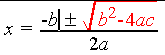
It will render natively in the Amaya browser, which can display both presentation and structure of the MathML markup, as shown below:
 |
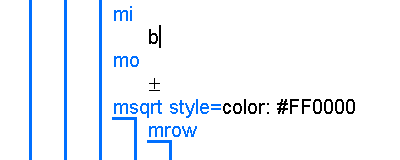 |
Note that the position of the cursor (in our case at "b") in the figures is synchronized to simplify editing. A useful interpretation of "colouring" part of the formula in red could be to emphasize that it is the discriminant, the quantity responsible for the nature of the roots of the quadratic equation.
There are specific MathML styling properties in form of certain attributes, whose names and acceptable values are defined by CSS1. In general, the MathML syntax for each attribute is intended to be a subset of the CSS syntax for the corresponding property.
The <mstyle> element is used to make style changes which affect the rendering of its contents. <mstyle> can be given any attribute accepted by any MathML presentation element; it can also be given certain special attributes. Roughly speaking, the effect of the <mstyle> element is to change the default value of an attribute for the elements it contains.
The syntax of certain attributes is specified using one of the symbols css-fontfamily or html-color-name, as shown in the following table:
| MathML Attribute | CSS Property | Syntax Symbol | MathML Elements | Reference |
| fontsize | font-size | - | presentation tokens; <mstyle> |
Section 3.2.1 |
| fontweight | font-weight | - | presentation tokens; <mstyle> |
Section 3.2.1 |
| fontstyle | font-style | - | presentation tokens; <mstyle> |
Section 3.2.1 |
| fontfamily | font-family | css-fontfamily | presentation tokens; <mstyle> |
Section 3.2.1 |
| color | color | html-color-name | presentation tokens; <mstyle> |
Section 3.3.4 |
| background | background | html-color-name | <mstyle> |
Section 3.3.4 |
Here is an example of the MathML markup (of the "Golden
Mean") using the <mstyle> element:
<math>
  <mrow>
    <mfrac>
      <mrow><mn>1</mn><mo>+</mo>
        <mstyle color="#ff0000">
          <msqrt><mrow><mn>5</mn></mrow></msqrt>
        </mstyle>
      </mrow>
      <mrow>
        <mn>2</mn>
      </mrow>
    </mfrac>
  </mrow>
</math>
This should render as:

Besides manipulating fonts or colours, the <mstyle>
element can also be used to adjust the quality of certain notations
such as stretchiness of a parenthesis or width of the line in a
fraction.
Scalar Vector Graphics (SVG) is a language for describing two-dimensional graphics in XML. The style sheet support in SVG, as much as possible, conforms to CSS2. SVG uses CSS properties to describe many of its document parameters, in particular, for the following:
The following facilities from CSS2 are supported in SVG:
The following is a SVG graphic with use of CSS, with style attributes attached to specific SVG elements:
<?xml version="1.0" encoding="UTF-8"?>
<!DOCTYPE svg PUBLIC "-//W3C//DTD SVG August 1999//EN"
  "http://www.w3.org/Graphics/SVG/svg-19990812.dtd">
<svg width="400" height="400" >
  <title>Circles</title>
  <desc>Three circles</desc>
  <g style="stroke:black; fill:none; stroke-antialiasing:true" >
    <circle cx="70" cy="100" r="50"
      style="fill:blue; stroke:none" />
    <circle cx="190" cy="100" r="50"
      style="fill:white; stroke:navy; stroke-width:4" />
    <circle cx="310" cy="100" r="50"
      style="fill:none; stroke:blue; stroke-width:4; stroke-dasharray:4 2" />
  </g>
</svg>
The resulting graphic will look like this:

The following observations are in order:
[class~=value].
The limitations of CSS as a presentational language for XML documents pointed out in this section range from social to technical.
Use CSS with care. It is the long-awaited salt on the Web-food; a little is necessary,
too much is not good cooking.
- Robert Caillau, Second Edition of "Cascading
Style Sheets: Designing for the Web"
CSS can be used to style any XML application, but that does not mean it is always "meaningful." The use of CSS with Synchronized Multimedia Integration Language (SMIL) is perhaps of little use. Similarly, although we have attempted to show some relevance, CSS has limited use with MathML markup. Presenting a mathematical expression in a certain font or colour, or adjusting its placement on a Web page is only useful to a certain extent. This has no direct bearing whether the user will understand the concept any better.
Although CSS style sheets can be very effective for improving the presentation of HTML documents, it has a number of limitations (a CSS Object Model is in the works) that can prohibit its effectiveness for complex XML applications:
These reasons have motivated the work on a new stylesheet language for XML, the Extensible Stylesheet Language (XSL). XSL is a simplified version of the Document Style Semantics and Specification Language Online (DSSSL-O), the style language for Standard Generalized Markup Language (SGML). Most of the features desired of a stylesheet language (mentioned above as limitations of CSS) have been incorporated in the XSL "family" of languages: XSL Formatting Semantics (XSL-FS) and XSL Transformations (XSLT).
In choosing a style sheet language for a particular document, it is important to consider whether the structure of the XML document is suitable for display. With CSS, the structure of the XML content must be virtually identical to the structure of the presentation. Since one of the goals of XML is a complete separation of content from presentation, many XML documents are difficult to display as you might wish using CSS.
Suppose we have the following XML document fragment:
<author>
<firstname>Albert</firstname>
<lastname>Einstein</lastname>
</author>
and the task is to present names in "Last name, First name"
format. With CSS, you can apply properties only to the
XSL provides the most of the formatting objects and properties of CSS. Over 90 percent of the properties in XSL are properties that are already defined in CSS. This set of properties (and formatting objects), however, is not sufficient to accomplish all the goals of XSL. The XSL Specification introduces a model for pagination and layout that can be extended to page structures beyond the simple page models. To achieve this control, XSL has extended the CSS set of formatting objects and formatting properties. The XSL extensions to CSS are:
Using the following XSL stylesheet, we can accomplish the task set in the previous example:
<xsl:template pattern="author">
  <xsl:sequence>
    <xsl:process select="lastname"/>
      <xsl:text>, </xsl:text> <!-- Note the whitespace after the comma. -->
    <xsl:process select="firstname"/>
  </xsl:sequence>
</xsl:template>
Whether CSS or XSL should be the language of choice for formatting XML documents has stirred a debate. In conclusion, CSS and XSL-FS are complementary rather than competitive to each other. For simple applications, creating CSS stylesheets could be more useful; for the complex ones, we may need the XSL-FS machinery. Note also that, while CSS works with both HTML and XML, XSL works only with XML. Furthermore, CSS is already established as a standard, having been gone through two iterations (CSS1 and CSS2, with CSS3 under development) while XSL is still evolving.
We will discuss XSL-FS, including a detailed comparison with CSS, in a future work.
XML with CSS : Shaping Structured Content
Separating structure from presentation is the essence of (semantically) meaningful, maintainable, accessible and evolvable document markup for the Web. The XML-CSS combination simplifies the document creation process. XML uses markup to describe the structure and content of a document; CSS, on the other hand, makes it possible to present that document, while preserving the structure, to the user in a renderer. Thus, we have style (beautification) in a semantically (meaningful) way in XML documents. Following the guidelines for creating CSS stylesheets, these documents can reach a wider community.
Perspectives of XML in E-Commerce
XML Conformance : The Burden of Proof
XML Entities and their Applications
XML Namespaces : Universal Identification in XML Markup
The Emperor has New Clothes : HTML Recast as an XML Application