
You are here: irt.org | Software Reviews | Web Editors | Helios TextPad 3.2.5 [ previous next ]
By: Martin Webb
How many times have you seen a (friendly) flame war in one of the newsgoups over who has the best tool for editing web pages - I've seen and even participated in a few. The argument in the end boils down to two points: an all singing, all dancing WYSIWYG HTML editor or just Notepad (included as part of the Microsoft Windows operating system)?
Either people want the ability to point and click when producing web pages, or they want to hand craft them and ensure they know exactly what is going into their pages. For this last point, Notepad is excellent, it offers the ability to edit text files and ...... well it offers the ability to edit text files.
What would be nice is if Notepad had the ability to load larger files, load more than one at a time, offer two views of the same document, search and replace text, search files on the computer and load the documents ready for editing, macros, sorting, spelling, file comparison, multiple undo (even past saves). Well look no further! TextPad offers this and more.
Small download size - small enough to fit on a floppy. TextPad is a powerful editor, but doesn't take an age to download from the net, or use up a lot of disk space (see Program Information for details).
Despite this, TextPad packs of lot of functionaility:
These are just the main features available with TextPad.
Imagine being able to replace similar HTML across all your pages, by just bringing up the Search Files option from the edit menu, finding all occurences in folders and/or subfolders, opening all the files in one go, then replacing all occurences in the opened files, before saving them back to disk again.
To show how simple it is to make global changes to an offline version of a web site the following four steps show all you need to do to change "javascript" to "JavaScript" across all your html files:
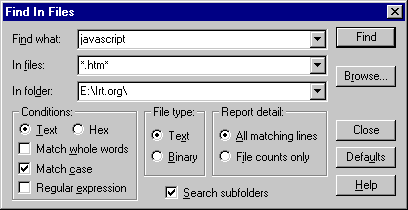
Pressing Ctrl+F5 (the control key and F5 at the same time) brings up the "Find in Files" dialogue box. Enter the details of the text to find, select the file criteria (e.g. .htm files) and the folder to search (e.g. e:\irt.org\):
Click "Find". The results of the search are returned into a Search Results window:
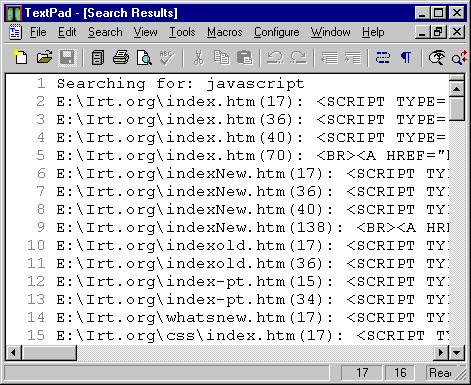
Clicking the right mouse button brings up the context sensitive menu. Selecting "Open all" opens up all of the documents in the Search Results window into TextPad ready for editing at the line containing the search string.
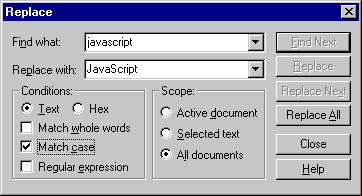
Pressing Ctrl+H brings up the "Replace" dialogue box. Enter the details of the "Replace with" text, select "All documents" and click "Replace All". Then sit back whilst all the occurences of "javascript" are replaced with "JavaScript":
Finally to save your efforts press Ctrl+Shift+S to save all files.
Of course you don't need to know any control key combinations, as all the facilities are available from the comprehensive menubar. There is also a full help facility which details everything available in TextPad.
The most useful feature of TextPad is that it's robust - I've been using TextPad for nearly six months without a single problem. I use it to create and edit all my text files. The vast majority of this site was built using TextPad.
| Program Information | ||
|---|---|---|
| Price | US$27.00 | Minimum Requirements |
| Publisher | Helios Software Solutions |
Windows 3.1 (16-bit Edition)
|
| A robust and versatile text editor which makes HTML editing much simpler. |
||
Microsoft FrontPage Express 2.0