
You are here: irt.org | Software Reviews | E-Commerce | Actinic Catalog 3.0 [ previous next ]
By: Pankaj Kamthan
There are various advantages that the Web offers to a business, one of them being selling over the Web.
Selling over the Internet requires a different approach to that of managing a usual store. To enable your customers to view your products (or services) and place orders, you need to place those in an electronic catalog which is accessible over the Web. Such an online catalog is a Web-based store where customers can browse through your products and services, make selections, place orders and pay for their purchases.
There are three major steps that you need to follow to sell over the Web:
It is Step 2 where the Actinic Catalog comes into picture, and is the basis of this review.
The catalog set-up is straightforward. All you have to do is insert information about your terms of business into the catalog using a series of information panels. You can take advantage of an existing style template (which also support frames) which can be configured according to your needs. Figure 1 illustrates the Template Manager.
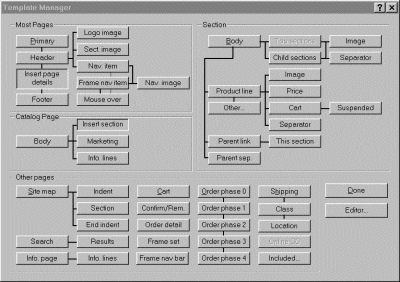
Figure 1 - Template Manager
To help your customers find the products, you can divide the catalog into sections, each dealing with a particular product type (it is also possible to import existing product information into a catalog). The description of a product can include all the pricing information you need. You can specify how a product should be taxed (various taxation systems, including, British, Canadian (to some extent) and American, are supported) and shipped, as well as what conditions (such as details of any discounts) are applied to the sale. Delivery charges are automatically calculated based on geographical location, weight, shipping method, and other factors.
Once you have finished entering product information, the catalog information can be displayed in a tree outline that's similar to Windows Explorer. Figure 2 shows an example of the interface.
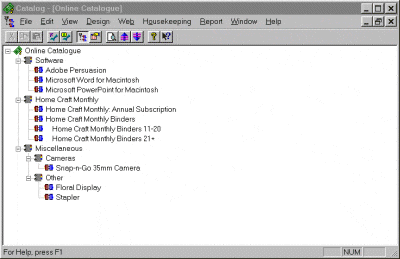
Figure 2 - Catalog Interface
You can "locally" preview the catalog pages using the preview button on the toolbar. To see a catalog functioning locally (with the script, and hence order forms etc. working) you would need Perl 5 and CGI capabilities locally (see Program Information).
Once you have finished creating the catalog, you can upload it to your Web site. A one-step upload procedure ensures that all parts of the catalog - product information, template files, image files, etc. are sent in their entirety to the Web server.
Once the catalog is up and running on your Web site, a customer can browse through the sections in the catalog, pick up an electronic shopping cart, and add the desired products to the cart. When all the desired products are picked up, the customer can simply place an order by adding name, address and payment details in a pre-defined order form. To help your customers, the form is already partially completed using the contents of the shopping cart. Then, with a single click of a button, the customer can send you the order.
If a customer doesn't know exactly what they are looking for, a catalog-wide search engine is available for returning specific or general items.
As a standard feature, you can present a marketing message for your customers. For example, you may want to highlight special offers, the high quality of your services, or the wide range of products that you can offer.
A demonstration of how a typical catalog works is provided on the Actinic Web site.
Once an order is received, it is stored in an orders file on your Web site. You can use Actinic Catalog software to download the outstanding orders (via a secure connection) to your local computer. You can also set-up the software so that it sends you an e-mail notifying you that a new order has been received on the Web site since the last download took place. The downloaded orders will be added to a local file of outstanding orders ready for you to process.
Outstanding orders and invoices can be printed or exported in a text or comma-delimited form to a file for further action by you. When the completed orders are ready to ship, you can mark them as shipped on the outstanding orders file. Out-of-stock items can be marked as cancelled and the order adjusted to match.
To keep track of the orders, the software allows you to deal with them at the item line level. You can ship parts of an order and mark the orders accordingly, but you cannot delete the order from the file until it has been completed (that is, when all order lines have either been shipped or cancelled).
The software can deal with a wide range of payment options including all types of credit cards, invoice with order, cash on delivery, check on delivery and invoice and payment before delivery. It also supports online credit card processing via NetBanx, DataCash, WorldPay and SecurePay. All transactions are encrypted using Actinic Catalog's integrated 256-bit Diffie-Hellman encryption. Another option includes the use of an existing secure SSL server provided by an ISP.
You will need to ensure that your "store" is well-publicized and added to the appropriate search engine indexes. More information on how to promote your site is available on the Actinic Web site.
You can make changes to the products in your catalog at any time, and thus keep the catalog up-to-date. Once changes have been made, you simply upload the revised catalog to your Web site.
You can change the way your customers use the catalog. At any time, you can change the way the catalog is set-up to receive orders and payments. For example, you can change the marketing messages in the catalog or disable receipt of payments by credit cards.
The advantages of Actinic Catalog are:
The limitations of Actinic Catalog are:
Actinic Catalog enables your business to grow by selling on the Web. It is a low-end solution that is best suited for small to medium-sized businesses that have a limited budget, who are not expecting major maintenance on the site and who can fulfill orders one at a time. It may not be a good choice for larger companies who may want database connectivity and integration with their accounting and inventory systems.
| Program Information | ||
|---|---|---|
| Price | US$399 | Minimum Requirements |
| Publisher | Actinic Software |
|
| A good e-commerce choice for a small to medium sized company with a limited budget. | ||
Resellers of Actinic Catalog in the US can be found at http://www.actinic.com/orac.htm.
Resellers of Actinic Catalog in the UK can be found at http://www.actinic.co.uk/orac.htm.