
Exporting data to Word with Cold Fusion
How to update/edit data using Cold Fusion
You are here: irt.org | Articles | Database | My First Forum - a bulletin board application [ previous next ]
Published on: Thursday 8th April 1999 By: Andrew Shatwell
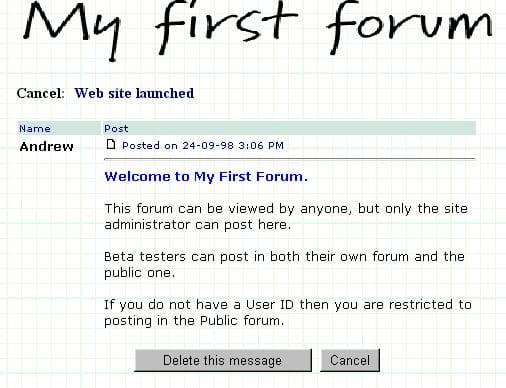
This screen is only available to users that have logged on. It is called from the openthread.cfm screen and asks for confirmation from the user about whether to delete their article.
The URL to get to this script will be similar to: http://www.myforum.com/cfm/Cancel.cfm?articleID=46
<CFINCLUDE TEMPLATE="check.cfm">
<CFQUERY NAME="ArticleDetails" DATASOURCE="#MyDatabase#">
  SELECT * FROM tblArticles WHERE ArticleID = #ArticleID#
</CFQUERY>
This is the last script to include the check.cfm file.
The ArticleDetails query retrieves information about to the article referenced in the URL.
<CFIF login.email eq ArticleDetails.UserEmail>
<!doctype html public "-//IETF//DTD HTML 3.2//EN">
<html>
<head>
<title>My First Forum</title>
<meta name="Generator" content="HTMLed32 Version 2.0a">
<meta name="Author" content="Andrew Shatwell">
</head>
<body BGCOLOR="#FFFFFF" BACKGROUND="../images/gridpaperbackground2.gif" link="#000080" vlink="#2f2f4f">
<div align="center">
<IMG SRC="../images/logo2.gif" BORDER="0" ALT="My First Forum" width="469" height="64">
</div>
<p>
<b>Cancel:</b>
<font color="#000080"><b><CFOUTPUT>#ArticleDetails.ThreadName#</CFOUTPUT></b></font>
<p>
<table cellpadding="1" border="0" width="95%">
<tr bgcolor="#D5E6E1">
<td NOWRAP width="18%" valign="top"><FONT SIZE="1" face="Verdana, Arial" color="#000080">Name</font></td>
<td valign="top" width="82%"><FONT SIZE="1" face="Verdana, Arial" color="#000080">Post</font></td></tr>
<CFOUTPUT QUERY="ArticleDetails">
<tr>
<td align="left" valign="top">
<FONT size="2" face="Verdana, Arial" ><b>#UserName#</b>
</td>
<td>
<FONT SIZE="1" face="Verdana, Arial" color="##000080">
<img src="../images/posticon.gif" width="14" height="11" border="0">
Posted on #dateformat(Posted,"dd-mm-yy")# #timeformat(Posted,"h:mm tt")#
</font>
<br><hr>
<FONT SIZE="2" face="Verdana, Arial">#paragraphformat(Message)#
</td>
</tr>
</CFOUTPUT>
</table>
<div align="center">
<form>
<CFOUTPUT><input type="button" value="Delete this message" onClick="location.href='Cancelmess.cfm?ArticleID=#ArticleID#'">
<input type="Button" value="Cancel" onClick="location.href='openthread.cfm?forum=#ArticleDetails.GroupID#&ThreadId=#ArticleDetails.ThreadID#'">
</CFOUTPUT>
</body>
</html>The first CFIF statement tests if the email address of the user currently logged on matches that of the author of the article. If the two addresses match then the article is displayed. The form at the bottom of the code passes the ID number of the article to the cancelmess.cfm file which contains the Cold Fusion script that actually deletes the article.
<CFELSE>
  <CFLOCATION URL="openthread.cfm?forum=#ArticleDetails.GroupID#&ThreadId=#ArticleDetails.ThreadID#">
</CFIF>
If the email address of the user does not match that belonging to the article then the CFLOCATION statement redirects the server back to the message screen.
Back to Replying to a message - part 2, or forward to Cancelling a message - part 2
Exporting data to Word with Cold Fusion
How to update/edit data using Cold Fusion